3 apps in 3 days
I moved my desktop computer out of the living room and back to my desk at home. Previously, we’d mainly used it to play games, but Steam Remote Play (and WiFi) has become good enough to stream to the TV in the living room. So I’m using it as a desktop again. Since I’ve mainly used low-power devices at home (a Pinebook Pro), it’s been amazing to have a machine that’s so responsive. The i7-12700K is … a lot more powerful than the RK3399 in the PBP, and 96GB RAM doesn’t hurt either.
I installed several apps that I use as a desktop user that weren’t really needed when it was just a game console. NordVPN, Todoist, and Bitwarden all have Linux desktop applications. They work, but they are Electron applications, and on my KDE Plasma desktop they don’t quite belong. They bring their own browser-shaped visual language instead of using the system’s controls, typography, icons, notifications, and conventions. I wanted the computer I was sitting in front of to feel more like one desktop than a pile of unrelated products. On my Pinebook Pro, these were out of the question—only native apps had “usable” performance on such a low-power device.
Quality
This is not an argument that Electron is bad. It is a rational choice for a company that has to support Windows, macOS, Linux, iOS, Android, and the web with a finite engineering team. Linux itself is not a single target: there are several desktop environments, toolkits, packaging systems, and expectations. Building both GTK and Qt applications—on top of every other platform—is a lot to ask. Native desktop specialists are rare, and volunteer developers are not always eager to build a polished front end for someone else’s subscription business. At Dropbox, I worked on our desktop client and saw the challenges here in both the cross-platform and native approaches.
Still, a coherent desktop is aesthetically pleasing. GNOME has built much of its platform identity around that idea: its Human Interface Guidelines treat shared principles and conventions as the route to applications that are beautiful and easy to use. Plasma has its own rich vocabulary in Breeze, Kirigami, and Qt Quick. An application does not need to mimic every other application, but it should feel like it knows where it is.
In Zen and the Art of Motorcycle Maintenance, Robert Pirsig articulated a notion of Quality: the thing one can recognize before reducing it to a checklist. I notice it when a window respects my theme, when a keyboard shortcut behaves as expected, or when a notification arrives through the system instead of from a private universe inside a browser engine. None of those details is decisive by itself. Together, they make the desktop feel high quality.
Three small native clients
So I made three native Plasma applications in three days. All three use Qt Quick and Kirigami; each has a GitHub Pages site and an open source repository.
KNord
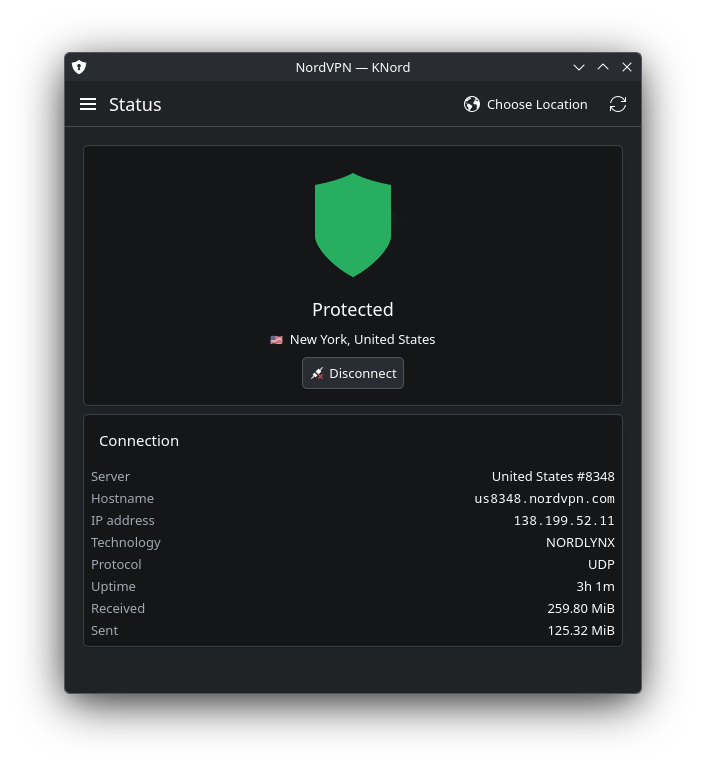
KNord is a native front end for the NordVPN command-line client. It has a connection-status page, quick connect, a searchable locations browser, and the settings that matter day to day. The important part is that it remains a normal Plasma application: it follows the Breeze theme, uses KDE integration points, and delegates VPN work to the official client already installed on the machine.
KTodo
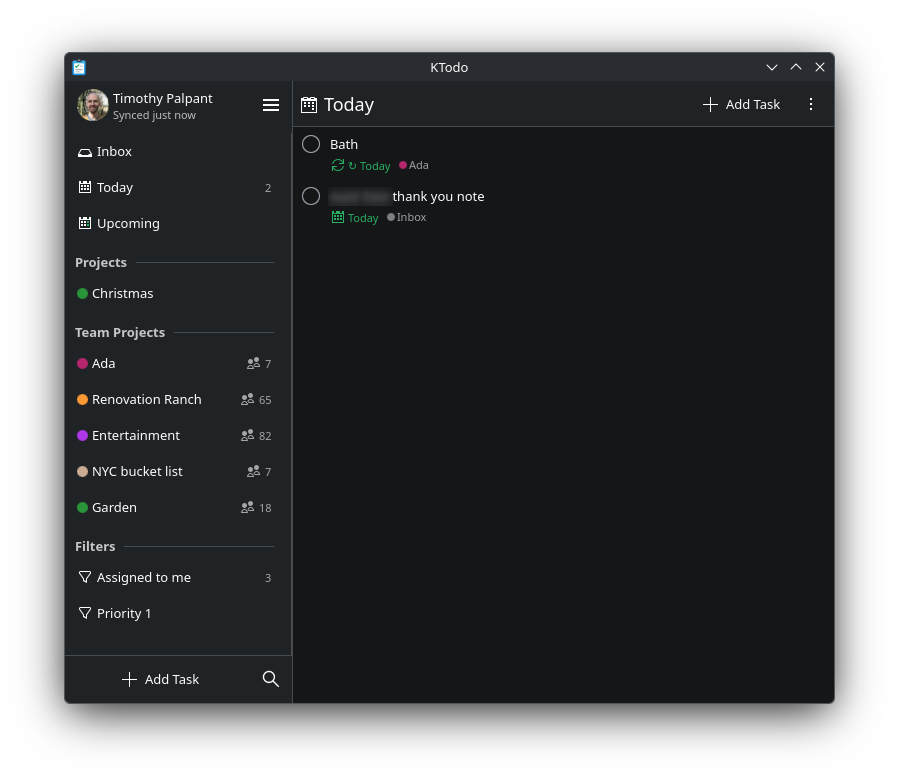
KTodo is an offline-first Todoist client. It keeps a local SQLite cache and queues edits for replay when the connection returns. Its Today, Upcoming, project, filter, scheduling, and notification views make Todoist feel like part of the desktop instead of a web app in a window.
KVault
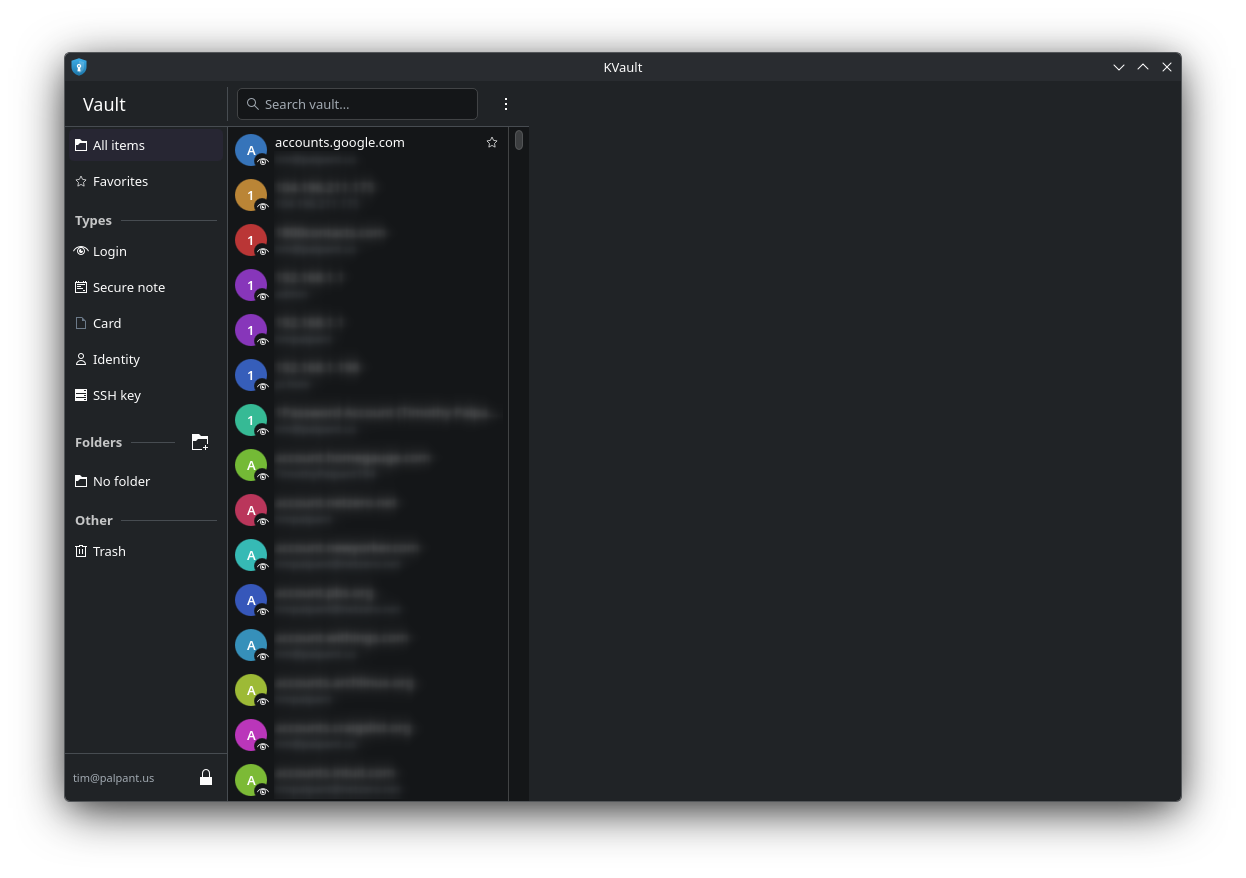
KVault is an unofficial native client for Bitwarden vaults. It talks to the Bitwarden API directly, keeps the synced vault encrypted locally, and includes search, TOTP codes, a password generator, and the usual item types. It is early software, and software that handles secrets deserves more care than an attractive screenshot can demonstrate—but it is already pleasant to use on my own desktop.
The ten-year delay
This was not my first interest in native application development. About a decade ago, I tried to learn Qt by reading Qt5 Cadaques. At roughly the same time, I was drawn to Aaron Hillegass’s Cocoa Programming for Mac OS X. I loved the idea of software that belonged to its operating system. My first internship used Adobe Flex, and I later made Territories, a tiny game in Flex. Part of me is still drawn to those large frameworks from previous eras.
But it was hard to get far enough for that idea to turn into an application. Qt means C++, its build system and object model, and QML—a declarative language with its own syntax, mental model, and failure modes. Then there is networking, authentication, storage, packaging, tests, and platform integration. Each is learnable; all of them together require a sustained stretch of time. With a full-time job, that stretch rarely appeared.
The agent loop
Now we have Claude Code and other AI agents. I described the applications I wanted, prompted agents to build them, and iterated from a running program. The code was completely vibe-coded in the literal sense: I did not begin by writing the implementation line by line.
That did not make the work hands-off. My job shifted toward product direction and quality assurance. I used the applications, found confusing flows and bugs, described the desired behavior, and sent the agents back for another pass. The loop was specification, implementation, use, feedback, and repair. It worked particularly well for a desktop app, where many of the important questions can only be answered by opening a window and seeing how it feels.
Across the three repos, the “handwritten” C++, headers, and QML come to about 24,500 lines. Of course this would not have been achievable (in this time frame) by hand.
I used ChatGPT Codex as a second kind of agent: release engineer. It set up and repaired GitHub Actions CI, produced draft release artifacts—including Flatpak bundles and Arch packages with checksums—and generated the GitHub Pages sites. That meant the applications did not stop at a local build; they acquired tests, packaging, releases, and a place to explain themselves.
The last mile is still social
I would like to publish the apps through Flathub and the AUR. For now, the release workflows can create pre-published packages, but the usual distribution paths are complicated.
Flathub’s current Generative AI policy does not allow applications containing AI-generated or AI-assisted code, documentation, or other content, subject to limited discretionary exceptions. Since these apps were made with agents throughout, I cannot submit them through the ordinary Flathub process under that policy.
The AUR was also recently disrupted by a wave of malicious package activity; Arch warned about the incident and temporarily disabled new registrations while it cleaned up. Registration has since reopened with additional safeguards, so that is no longer a technical blocker, but I have not published AUR packages yet.
Conclusions
This leaves me unexpectedly ambivalent. There was still real work: deciding what the applications should do, using them, finding failures, and explaining the next correction. But the difficult, slow effort I had once associated with making an application—the apprenticeship in a framework and the line-by-line construction of its behavior—is no longer the gate it had been, nor a point of pride when you’ve achieved it.
As a user, this is close to unambiguously great. I have three tools that fit my desktop better, and I enjoy using them every day. As a developer, I am less sure that it carries the same satisfaction. There is a faint malaise in getting precisely what I wanted so quickly, then wondering whether I made the software in the old sense or merely directed its appearance. The applications are real; my accumulated understanding of every part of them is not.
There is no turning the clock back. The agents will not disappear, and neither will the economic pressure that made native desktop software scarce in the first place. Of course, others are going much farther—even building an entire desktop.
For now, I am glad my desktop feels more like a place I chose—and uneasy about how little effort it took to make it so.